
🔐 OIDC Authentication
SSO via OpenID Connect. Users log in with their existing identity provider.
Setup
Go to Settings → Authentication → Add Provider.
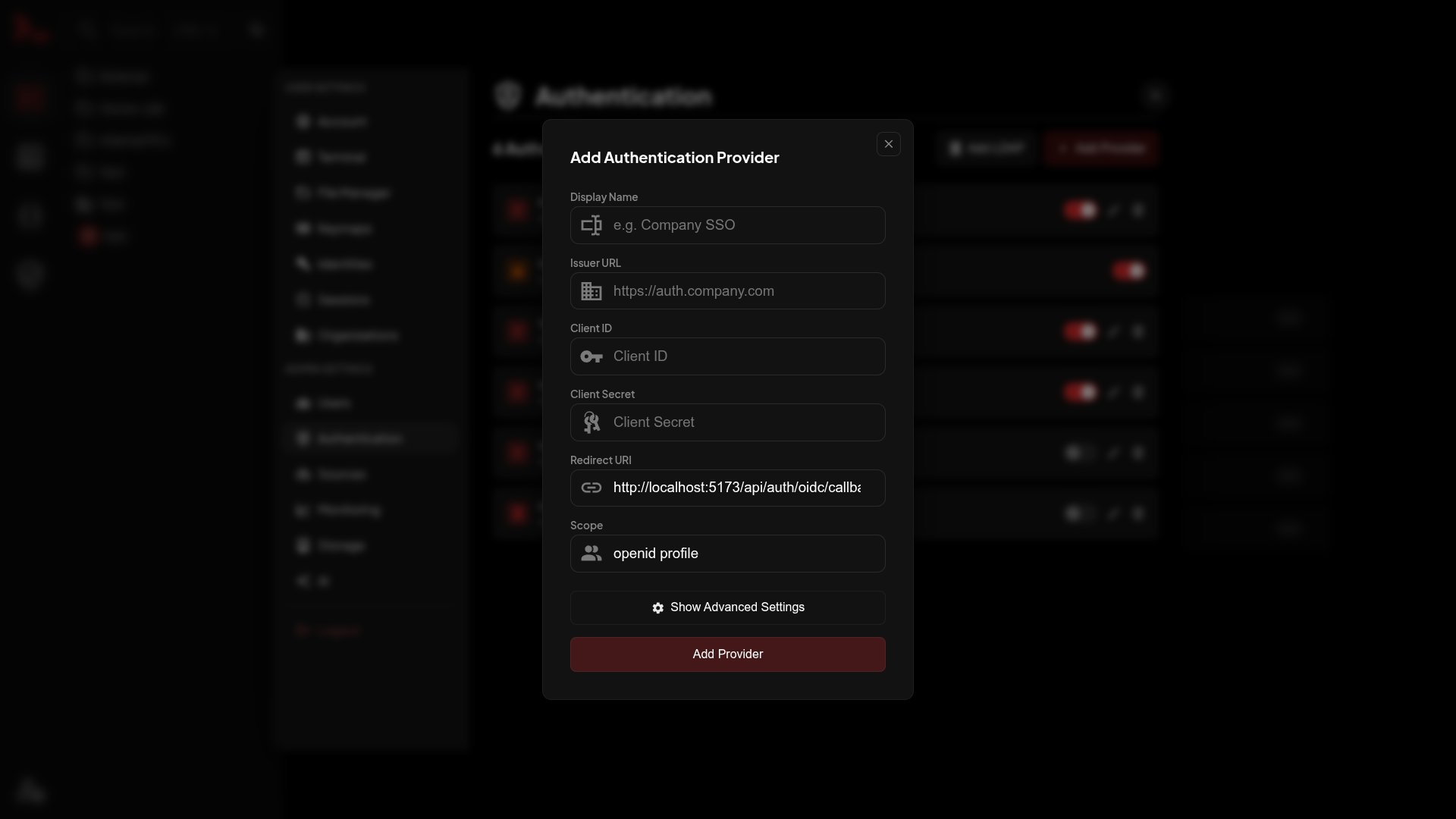
| Field | Description |
|---|---|
| Display Name | Shown on login button |
| Issuer URL | IdP's discovery URL |
| Client ID | From your IdP |
| Client Secret | From your IdP |
| Redirect URI | Copy this to your IdP |
| Scope | Usually openid profile |
| End Session Endpoint | Optional logout URL override when discovery does not advertise one |
Provider Setup
Microsoft Entra ID (Azure AD)
- Azure Portal → Microsoft Entra ID → App registrations → New registration
- Add redirect URI:
https://nexterm.yourdomain.com/api/auth/oidc/callback - Copy Application (client) ID → Client ID
- Certificates & secrets → New client secret → copy value → Client Secret
- Issuer URL:
https://login.microsoftonline.com/{tenant-id}/v2.0
Google
- Google Cloud Console → APIs & Services → Credentials
- Create Credentials → OAuth client ID → Web application
- Add redirect URI:
https://nexterm.yourdomain.com/api/auth/oidc/callback - Issuer URL:
https://accounts.google.com
WARNING
Google requires app verification for production. Add test users in OAuth consent screen during dev.
Keycloak
- Clients → Create client
- Enable Client authentication
- Add redirect URI, copy Client Secret from Credentials tab
- Issuer URL:
https://keycloak.yourdomain.com/realms/{realm-name}
Authentik
- Applications → Providers → Create → OAuth2/OpenID Provider
- Set redirect URI, copy Client ID/Secret
- Issuer URL:
https://authentik.yourdomain.com/application/o/{application-slug}/
TIP
The trailing slash matters. Check /.well-known/openid-configuration to see the exact issuer value.
Authelia
identity_providers:
  oidc:
    clients:
      - client_id: nexterm
        client_secret: '$pbkdf2-sha512$your-hashed-secret'
        redirect_uris:
          - https://nexterm.yourdomain.com/api/auth/oidc/callback
        scopes: [ openid, profile, email ]
Issuer URL: https://auth.yourdomain.com
Logout Setup
Register this post-logout redirect URI with your identity provider in addition to the login redirect URI:
https://<nexterm-host>/api/auth/oidc/logout/callbackNexterm uses the provider's discovered end_session_endpoint by default. If the provider does not advertise one, set End Session Endpoint in the provider's Advanced Settings. The configured override takes precedence over discovery.
Sessions created before upgrading do not have an ID-token hint and therefore use local-only logout until the user signs in again. Providers without a logout endpoint also continue to log out locally.
For Authentik, add both the login callback and post-logout callback to the provider's allowed redirect URIs.
Attribute Mapping
Defaults in Advanced Settings:
| Field | Claim |
|---|---|
| Username | preferred_username |
| First Name | given_name |
| Last Name | family_name |
Group Sync
In Advanced Settings, under Group Sync, you can map group claims from your identity provider to Nexterm organizations and restrict access to specific users.
| Field | Description |
|---|---|
| Groups Claim | The claim in the userinfo/ID token response that contains the user's groups, e.g. groups. Accepts a JSON array or a space/comma separated string. Leave empty to disable group sync. |
| Required Group | If set, only users whose groups claim contains this value are allowed to log in. Useful when your identity provider has many users who shouldn't have access to Nexterm. |
| Organization Mappings | A list of group value → organization (+ role) mappings. On every login, Nexterm adds the user as a member (or owner) of every mapped organization whose group value is present in their claim, and removes them from any organization that was previously granted this way but is no longer matched. |
Memberships created through group sync are tracked separately from manually invited members, so removing a group mapping — or a user losing a group in your IdP — never touches memberships that were added by hand. Organization owners added by manual invitation are never removed by sync.
Keycloak Example
- In your realm, create a Client Scope (e.g.
groups) with a Group Membership mapper, add it to your client. - Set Groups Claim to
groups. - Add mappings such as
/devops → DevOps Teamor set Required Group to/nexterm-usersto gate access.
Troubleshooting
Redirect URI mismatch - Must match exactly. Check trailing slashes, http vs https.
User attributes wrong - Check claim names in your IdP's token and adjust mapping.