
Reverse Proxy & Cloudflare Tunnel
This guide helps you with setting up Nexterm behind a reverse proxy or Cloudflare Tunnel. Make sure WebSocket support is enabled for it to work.
Nginx
nginx
server {
    listen 80;
    server_name nexterm.yourdomain.com;

    location / {
        proxy_pass http://127.0.0.1:6989;
        proxy_http_version 1.1;

        # WebSocket support
        proxy_set_header Upgrade $http_upgrade;
        proxy_set_header Connection "upgrade";

        proxy_set_header Host $host;
        proxy_set_header X-Real-IP $remote_addr;
        proxy_set_header X-Forwarded-For $proxy_add_x_forwarded_for;
        proxy_set_header X-Forwarded-Proto $scheme;

        proxy_read_timeout 86400;
    }
}
With SSL, add a redirect block and use listen 443 ssl http2 with your cert paths.
Apache
Enable modules first:
sh
sudo a2enmod proxy proxy_http proxy_wstunnel rewriteapache
<VirtualHost *:80>
    ServerName nexterm.yourdomain.com

    ProxyPreserveHost On

    # WebSocket
    RewriteEngine On
    RewriteCond %{HTTP:Upgrade} websocket [NC]
    RewriteCond %{HTTP:Connection} upgrade [NC]
    RewriteRule ^/?(.*) ws://127.0.0.1:6989/$1 [P,L]

    ProxyPass / http://127.0.0.1:6989/
    ProxyPassReverse / http://127.0.0.1:6989/
    ProxyTimeout 86400
</VirtualHost>
Caddy
caddy
nexterm.yourdomain.com {
    reverse_proxy 127.0.0.1:6989
}
Caddy handles WebSockets and SSL automatically.
Traefik (Docker)
yaml
services:
  nexterm:
    labels:
      - "traefik.enable=true"
      - "traefik.http.routers.nexterm.rule=Host(`nexterm.yourdomain.com`)"
      - "traefik.http.routers.nexterm.entrypoints=websecure"
      - "traefik.http.routers.nexterm.tls.certresolver=letsencrypt"
      - "traefik.http.services.nexterm.loadbalancer.server.port=6989"
Cloudflare Tunnel
Cloudflare Tunnel lets you expose Nexterm to the internet without opening inbound ports. Traffic flows through Cloudflare's network, giving you DDoS protection and optional Zero Trust authentication.
Prerequisites
- A Cloudflare account with an active domain
cloudflaredinstalled on your server (download)
1. Create a Tunnel
Log in to Cloudflare Zero Trust and go to Networks → Connectors.
- Click Create a tunnel
- Choose Cloudflared as the connector type
- Give your tunnel a name (e.g.,
nexterm) - Copy the installation command and run it on your server
2. Configure the Public Hostname
After creating the tunnel, add a public hostname:
| Field | Value |
|---|---|
| Subdomain | nexterm (or your preference) |
| Domain | Select your domain |
| Type | HTTP |
| URL | localhost:6989 |
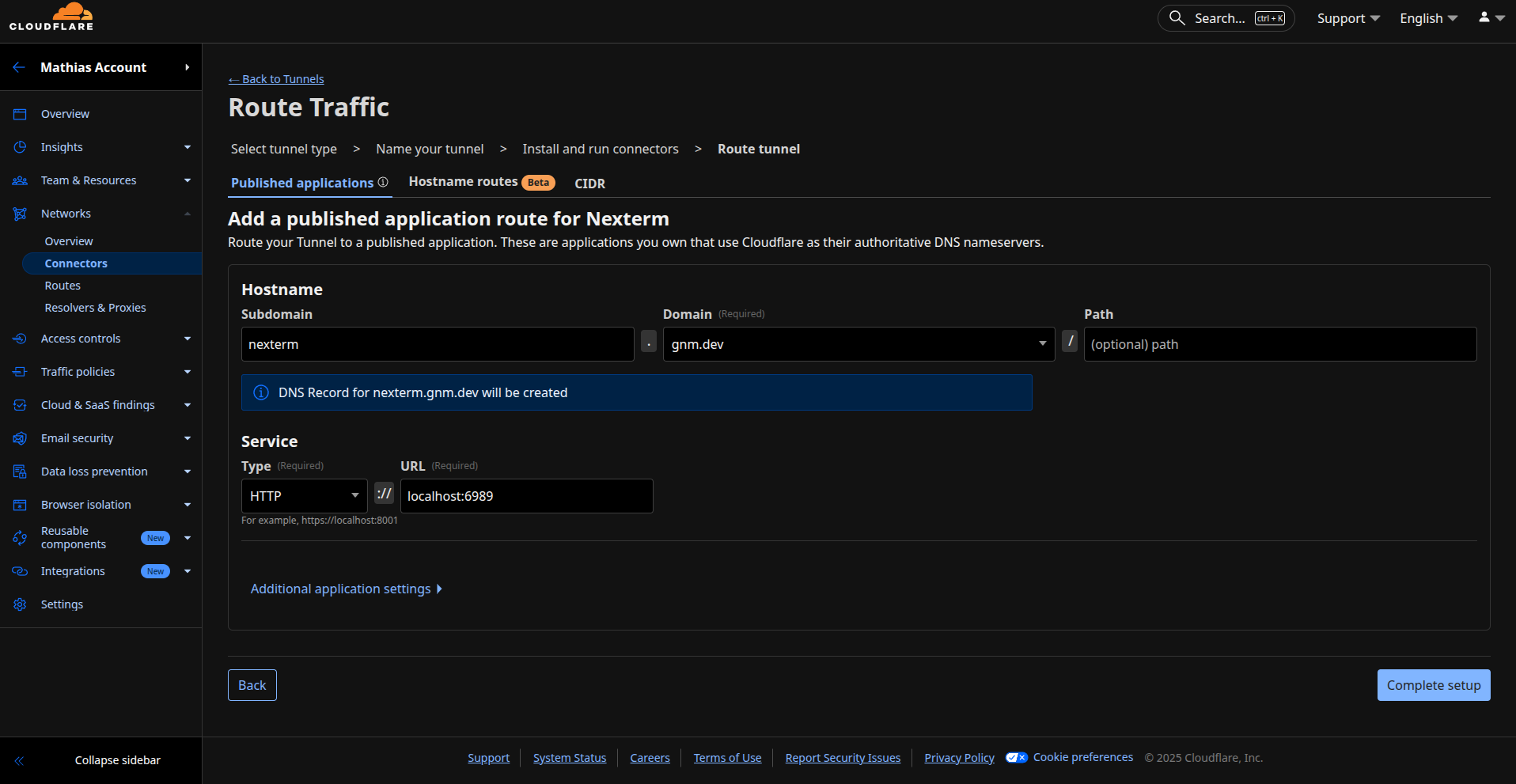
Click Save tunnel. Your Nexterm instance should now be accessible at https://nexterm.yourdomain.com.